
Late / unpaid salaries, rent or alimony
See also :
The dollar ($) has been used in these examples, but any other currency (€, £, F, ¥, R, DA, Rs… etc.) may be used.
Most of the calculations below may use Fixed (unique interest rates) or Variable rates.
Real-life examples:
Unpaid salary indexed according to an agreement
Unpaid salary indexed according to an agreement
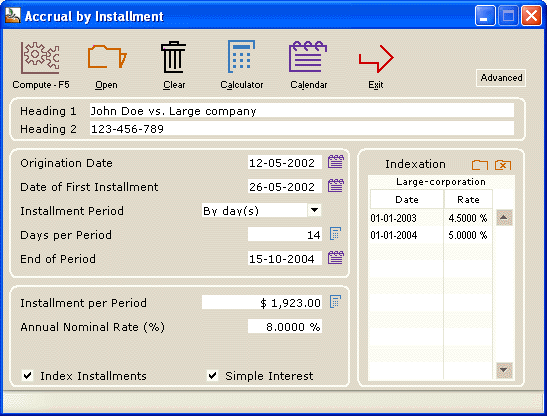
The employer fires the employee on May 12, 2002. Judgment is rendered October 2004 ordering the reinstatement of the employee and all back pay.
- Annual salary : $50,000 ($1923 every 2 weeks)
- According to the contract (collective agreement) the salary is to be indexed on January 1, 2003 by 4.5%, January 1, 2004 by 5%.
How much is owed on the date of the judgment? The legal interest rate can either be variable or a unique rate (in this case we will suppose the rate is 8%).
Simple interest is used in this situation (compound interest could also be used depending on the jurisdiction).
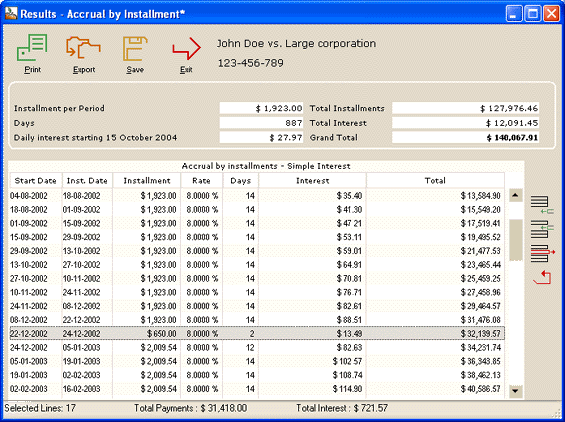
- On December 24, 2002, the employee would have received a $650 Christmas bonus.
The Results screen show each pay and the balance. Lines may be added (the Christmas bonus) , installments changed, installments deleted, interest rates changed, etc.
The total is then calculated automatically.
Late and unpaid rent
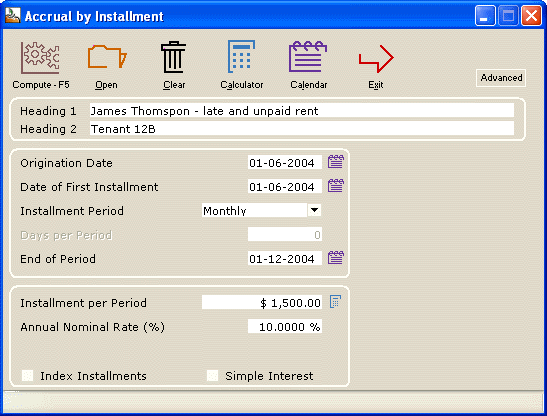
- A tenant did not pay his June rent
- His July 1 rent was only paid on July 18
- The August, September and November rents were unpaid
- Rent is $1500 per month
How much is owed on December 1 if the late rent interest rate is 10% annually (monthly compound interest – could also be simply interest). The rates can also be variable legal interest rates depending on the jurisdictions.
Preliminary data input screen
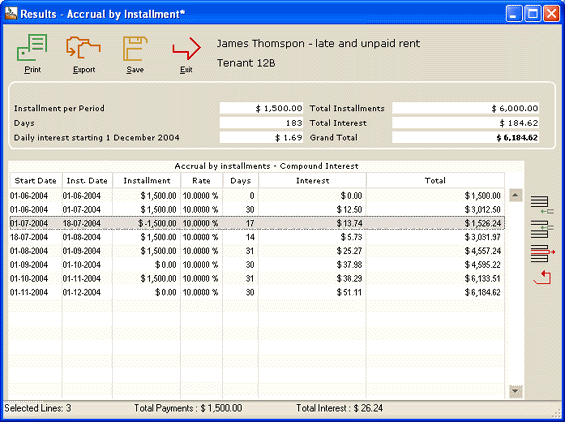
Results screen that has been edited to reflect the various events
The highlighted line (August 18) has an amount of minus $1500 (-$1500) since the payment is received on this date (17 days late that bear interest).
The October rent was paid, thus we changed the original $1500 to $0.00. In all, 4 rents were unpaid ($6000) bearing a total interest on December 1 of $184.64)
Late / unpaid alimony
The same principles as above apply to late alimony or any other late sum which is due.
If the alimony payment is automatically indexed according to the law, an indexation tale may be created easily in Margill and used in the calculation.